How to Program CNC Wood Router?
2026-01-10
With the continuous development of intelligent manufacturing and automated processing, CNC engraving machines have been widely used in various industries such as woodworking, advertising, mold making, stone processing, and metal processing. If you own this powerful machine that can transform your design drawings into physical objects, you're probably wondering how to set it up and make it work for you.
This guide will provide detailed answers, systematically explaining everything from basic principles and common methods to actual operating procedures.
What is CNC Engraving Machine Programming?
Simply put, CNC engraving machine programming is using software or code instructions to tell the machine "how to move the tool, where to move it, and at what speed to process." These instructions are converted into a program that the CNC system can recognize, thereby controlling the spindle speed, feed rate, and machining path.
What are G-code and M-code in a CNC Router?
G-code primarily controls the machine tool's geometric movements and related settings, telling the spindle where to go. Examples include tool path, coordinate system selection, and interpolation method.
Common G-code examples: G00: Rapid positioning (tool moves rapidly to the target point without cutting), G01: Linear interpolation (tool cuts along a straight line), G02/G03: Circular interpolation (clockwise/counterclockwise circular cutting).
M-codes control machine functions, such as spindle start/stop, coolant on/off, program termination, and other non-motion operations.
Common M-code examples: M03 (spindle forward), M04 (spindle reverse), M05 (spindle stop).
The most common programming code form is G-code, which is currently the most widely used control language in CNC equipment.
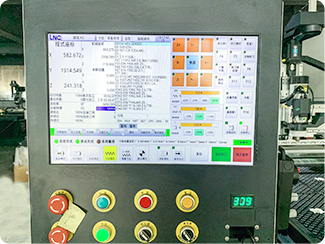
Basic CNC Programming Flow:
1. Graphic Drawing/Import (CAD): Draw patterns directly within the software or import external design files in AI or DXF formats;
2. Toolpath Generation (CAM): The software automatically calculates the toolpath, and the preview function can be used to check for discontinuities;
4. Post-processing: Select a control system compatible with the equipment (such as GRBL or Weihong system) to generate G-code files in .nc or .txt format;
5. Program Transfer: Transfer the code to the CNC engraving machine control system via USB flash drive or data cable to complete programming preparation.
Standard Operating Steps for CNC Engraving Machine Programming:
Confirm the processing material and dimensions:
Determine whether it is wood, acrylic, aluminum, or stone, as different materials have significantly different parameters.
Select appropriate tools:
Such as flat-end cutters, ball end mills, and V-cutters; different processes require different tools.
Set processing parameters:
Including depth of cut, feed rate, spindle speed, etc.
Generate and check the toolpath:
Simulate the processing process through software to avoid tool collisions and missed areas. Export Program and Test Cut
For small batches or new programs, it is recommended to run the program empty or perform a test cut first.
Formal Machining and Optimization
Fine-tuning parameters based on actual results improves machining efficiency and surface quality.
Common Problems and Precautions During Programming
Incorrect coordinate origin setting: Can easily lead to overall offset or scrapping.
Inappropriate feed rate: Too fast and the tool may break; too slow and efficiency is affected.
Ignoring material properties: Different materials have different requirements for spindle speed and cutting method.
Failure to perform simulation checks: Increases the risk to equipment and tools.
Conclusion
Mastering CNC engraving machine programming is an extremely valuable skill. Starting with automatic software programming and gradually understanding toolpath logic and G-code principles is currently the most efficient learning path in the industry. With the continuous upgrading of CNC technology, mastering programming skills will not only improve machining quality but also significantly enhance the production competitiveness of enterprises.
We are happy to help you succeed. Please feel free to contact us anytime.